


AgentCore harness でエージェントを動かし Code Interpreter によるサンドボックス環境でのコード実行や Gateway による外部ツールへの権限付与を試す
awsllmAgentCore harness はモデルやツール、スキルなどを設定するだけで Amazon Bedrock AgentCore 上にエージェントループや実行環境を構築してくれるマネージドハーネス。 利用できるツールとしてビルトインのファイル操作とサンドボックス環境でコードを実行するための Code Interpreter を与えて作ってみる。メモリが有効だと古いデータを読んでしまい Gateway の検証がしづらいので無効にしている。
const sandboxTool: agentcore.CfnHarness.HarnessToolProperty = {
  type: 'agentcore_code_interpreter',
  name: 'sandbox',
}

const role = new iam.Role(this, 'MinimalHarnessRole', {
  roleName: 'AgentCoreDemoMinimalRole',
  assumedBy: new iam.ServicePrincipal('bedrock-agentcore.amazonaws.com', {
    conditions: {
      StringEquals: { 'aws:SourceAccount': this.account },
      ArnLike: { 'aws:SourceArn': `arn:aws:bedrock-agentcore:${this.region}:${this.account}:*` },
    },
  }),
  inlinePolicies: {
    MinimalHarness: new iam.PolicyDocument({
      statements: [
        new iam.PolicyStatement({
          sid: 'BedrockModelInvocation',
          actions: ['bedrock:InvokeModel', 'bedrock:InvokeModelWithResponseStream'],
          resources: [
            'arn:aws:bedrock:*::foundation-model/*',
            `arn:aws:bedrock:*:${this.account}:inference-profile/*`,
          ],
        }),
        new iam.PolicyStatement({
          sid: 'EcrPublicPull',
          actions: ['ecr-public:GetAuthorizationToken', 'sts:GetServiceBearerToken'],
          resources: ['*'],
        }),
        new iam.PolicyStatement({
          sid: 'Telemetry',
          actions: [
            'logs:CreateLogGroup', 'logs:CreateLogStream', 'logs:PutLogEvents',
            'logs:DescribeLogStreams', 'logs:DescribeLogGroups',
            'xray:PutTraceSegments', 'xray:PutTelemetryRecords',
            'xray:GetSamplingRules', 'xray:GetSamplingTargets',
          ],
          resources: ['*'],
        }),
        new iam.PolicyStatement({
          sid: 'CloudWatchMetricsPublish',
          actions: ['cloudwatch:PutMetricData'],
          resources: ['*'],
          conditions: { StringEquals: { 'cloudwatch:namespace': 'bedrock-agentcore' } },
        }),
        new iam.PolicyStatement({
          sid: 'AgentCoreWorkloadIdentity',
          actions: [
            'bedrock-agentcore:GetWorkloadAccessToken',
            'bedrock-agentcore:GetWorkloadAccessTokenForJWT',
          ],
          resources: [
            `arn:aws:bedrock-agentcore:${this.region}:${this.account}:workload-identity-directory/default`,
            `arn:aws:bedrock-agentcore:${this.region}:${this.account}:workload-identity-directory/default/workload-identity/*`,
          ],
        }),
        new iam.PolicyStatement({
          sid: 'AgentCoreMemory',
          actions: [
            'bedrock-agentcore:CreateEvent', 'bedrock-agentcore:DeleteEvent',
            'bedrock-agentcore:GetEvent', 'bedrock-agentcore:ListEvents',
            'bedrock-agentcore:RetrieveMemoryRecords',
          ],
          resources: [`arn:aws:bedrock-agentcore:${this.region}:${this.account}:memory/*`],
        }),
        new iam.PolicyStatement({
          sid: 'AgentCoreCodeInterpreterDefault',
          actions: [
            'bedrock-agentcore:StartCodeInterpreterSession',
            'bedrock-agentcore:StopCodeInterpreterSession',
            'bedrock-agentcore:GetCodeInterpreterSession',
            'bedrock-agentcore:ListCodeInterpreterSessions',
            'bedrock-agentcore:InvokeCodeInterpreter',
          ],
          resources: [`arn:aws:bedrock-agentcore:${this.region}:aws:code-interpreter/*`],
        }),
      ],
    }),
  },
})

new agentcore.CfnHarness(this, 'MinimalHarness', {
  harnessName: 'demo_minimal_harness',
  executionRoleArn: role.roleArn,
  model: { bedrockModelConfig: { modelId: 'global.anthropic.claude-sonnet-4-6' } },
  systemPrompt: [
    {
      text: [
        'あなたは計算と検証を任される助手です。',
        '',
        '使えるもの:',
        '- sandbox: Python を実行できる。外部ネットワークには接続できない。',
        '- file_operations: ファイルの作成・閲覧・編集ができる。セッション内でのみ保持される。',
        '',
        '方針:',
        '- 数値の計算・集計・検証は暗算や推測で答えない。必ず sandbox で実行して確かめる。',
        '- 途中結果や長い出力はファイルに書き、必要な部分だけ読み返す。',
        '- 外部から情報は取得できない。与えられた入力だけで答える。',
      ].join('\n'),
    },
  ],
  memory: { disabled: {} },
  tools: [sandboxTool],
  allowedTools: ['@sandbox', '@builtin/file_operations'],
  maxIterations: 10,
  timeoutSeconds: 300,
})
Runtime や Memory といったリソースがまとめて作成される。Runtime はセッション期間中の CPU とメモリの使用量に対して課金される。
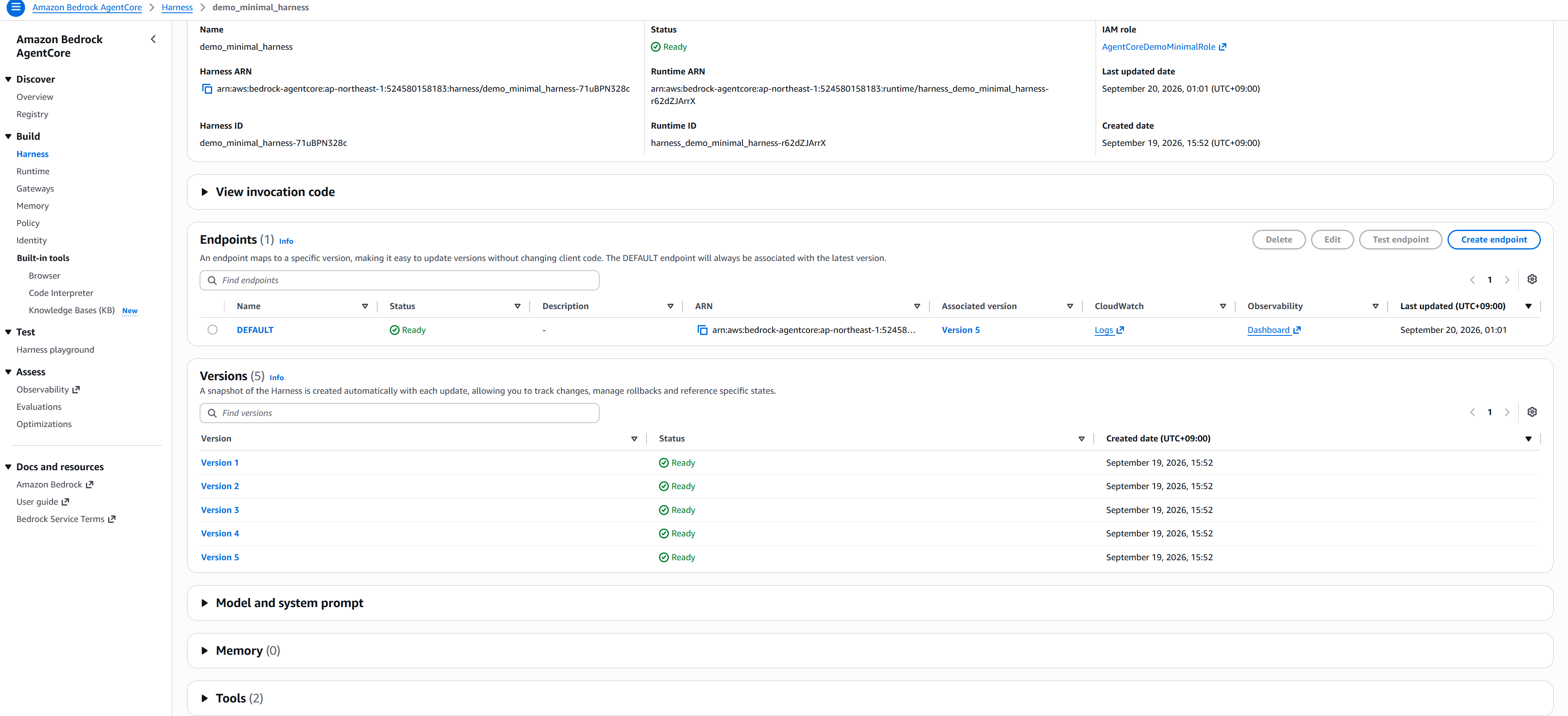
ただしこの Runtime を直接 Invoke することはできない。
$ aws bedrock-agentcore invoke-agent-runtime \
    --agent-runtime-arn "arn:aws:bedrock-agentcore:ap-northeast-1:524580158183:runtime/harness_demo_minimal_harness-r62dZJArrX" \
    --payload "$(echo -n '{"messages":[{"role":"user","content":[{"text":"hi"}]}]}' | base64 -w0)" \
    /dev/stdout

aws: [ERROR]: An error occurred (ValidationException) when calling the InvokeAgentRuntime operation: The agent runtime arn:aws:bedrock-agentcore:ap-northeast-1:524580158183:runtime/harness_demo_minimal_harness-r62dZJArrX is managed by a harness and cannot be invoked directly. Use the InvokeHarness API with the relevant harness ID instead.
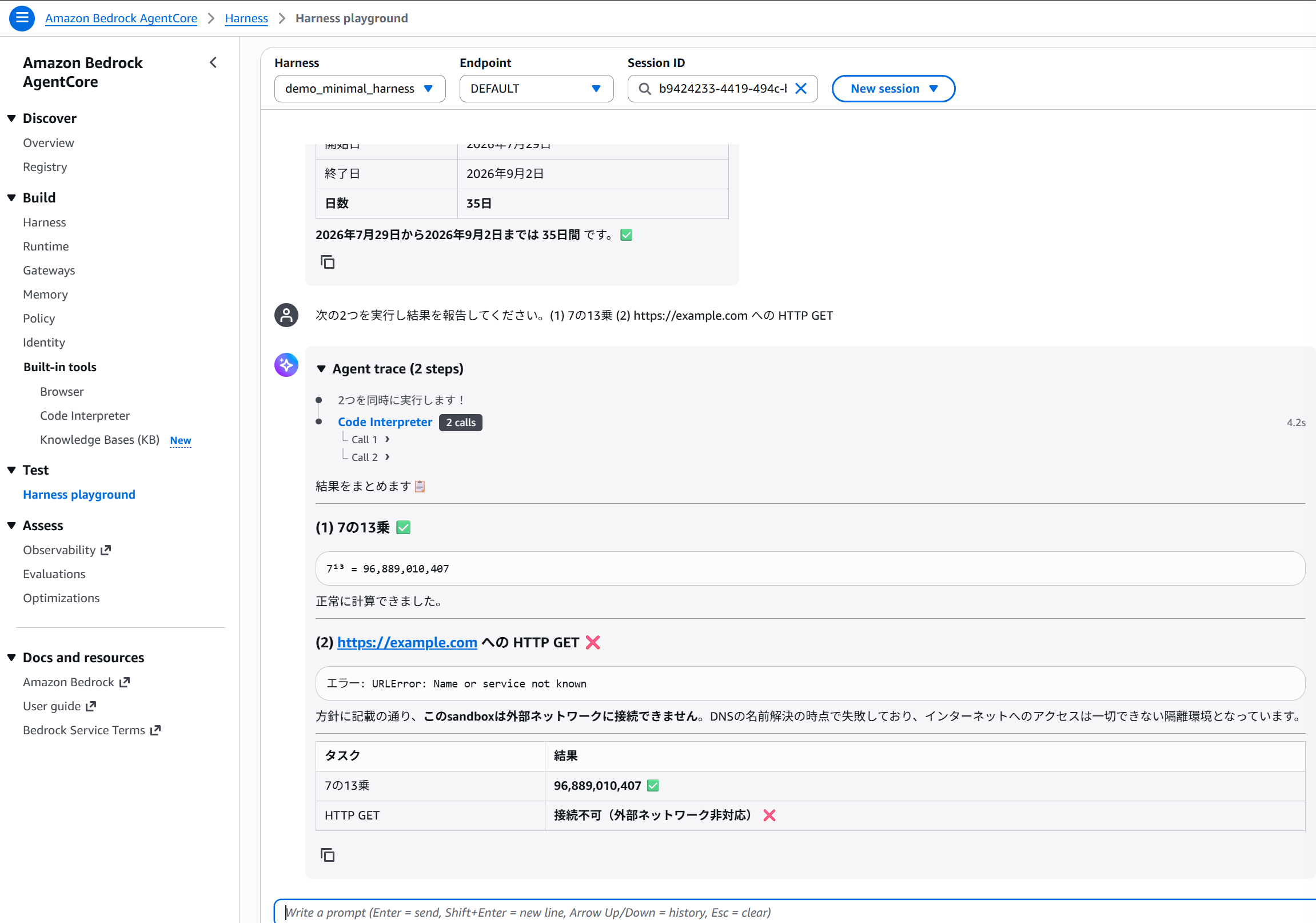
Playground で動かしてみるとネットワーク遮断されたサンドボックスで処理が実行されることが確認できる。
次にエージェントが Gateway を介して Lambda を呼べるようにする。
 const datasetFn = new lambda.Function(this, 'DatasetFn', {
  runtime: lambda.Runtime.PYTHON_3_12,
  architecture: lambda.Architecture.ARM_64,
  handler: 'index.handler',
  code: lambda.Code.fromAsset(path.join(__dirname, '..', '..', 'tools', 'dataset')),
  timeout: Duration.seconds(10),
  environment: { DATASET_SOURCE: 'agentcore-demo' },
});

const policyEngine = new agentcore.PolicyEngine(this, 'PolicyEngine', {
  policyEngineName: 'agentcore_demo_engine',
  description: 'どのエージェントがどのツールを呼べるかを決める',
});

const dataGateway = new agentcore.Gateway(this, 'DataGateway', {
  gatewayName: 'agentcore-demo-data-gateway',
  authorizerConfiguration: agentcore.GatewayAuthorizer.usingAwsIam(),
  policyEngineConfiguration: {
    policyEngine,
    mode: agentcore.PolicyEngineMode.ENFORCE,
  },
})

dataGateway.addLambdaTarget('DatasetTarget', {
  gatewayTargetName: 'data',
  lambdaFunction: datasetFn,
  toolSchema: agentcore.ToolSchema.fromInline([
    {
      name: 'get_dataset',
      description:
        '計測データを取得する。利用可能な name: latency_ms, throughput。'
        + '値は呼び出さないと分からないので、推測で答えないこと。',
      inputSchema: {
        type: agentcore.SchemaDefinitionType.OBJECT,
        properties: {
          name: {
            type: agentcore.SchemaDefinitionType.STRING,
            description: 'データセット名。latency_ms または throughput。',
          },
        },
        required: ['name'],
      },
    },
  ]),
})

const gatewayTool: agentcore.CfnHarness.HarnessToolProperty = {
  type: 'agentcore_gateway',
  name: 'data_gateway',
  config: {
    agentCoreGateway: {
      gatewayArn: dataGateway.gatewayArn,
      outboundAuth: { awsIam: {} },
    },
  },
}

/*
{
  sid: 'InvokeDataGateway',
  actions: ['bedrock-agentcore:InvokeGateway'],
  resources: [dataGateway.gatewayArn],
}
*/
mode が ENFORCE で権限がないと tools/list 自体に含まれないため呼びに行こうともしない。
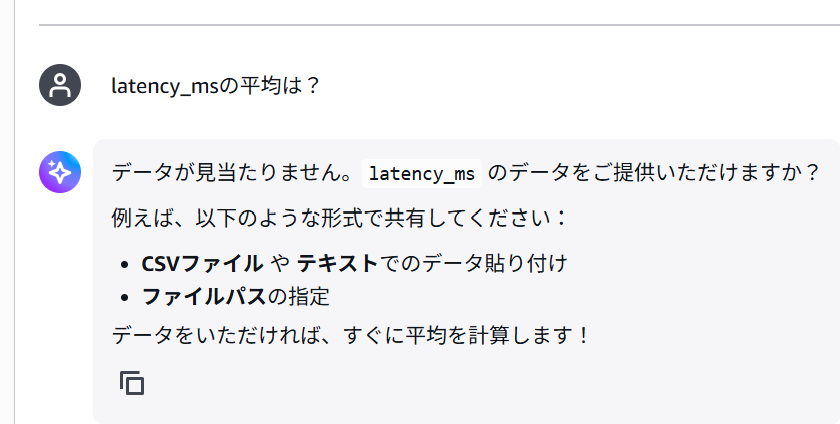
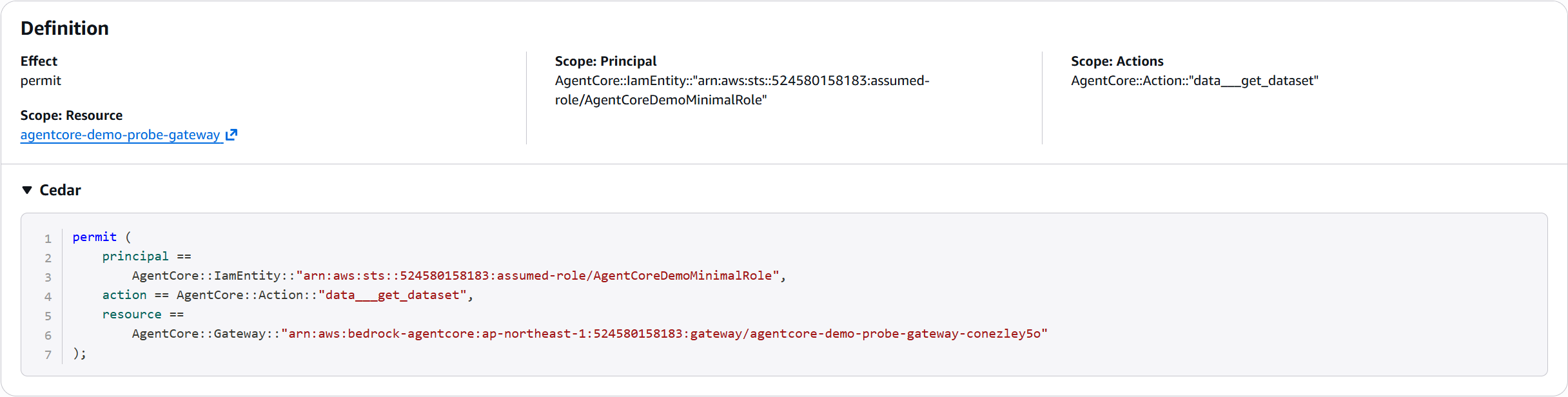
IAM Role のプリンシパルに対して get_dataset を許可するポリシーを追加する。
const minimalReadPolicy = policyEngine.addPolicy('MinimalRead', {
  policyName: 'allow_minimal_get_dataset',
  statement: new agentcore.PolicyStatement({
    effect: agentcore.PolicyEffect.PERMIT,
    principal: agentcore.PolicyPrincipal.entity(
      'AgentCore::IamEntity',
      `arn:aws:sts::${this.account}:assumed-role/AgentCoreDemoMinimalRole`,
    ),
    action: agentcore.PolicyAction.one('AgentCore::Action::"data___get_dataset"'), // {gatewayTargetName}___get_dataset
    resource: agentcore.PolicyResource.instance(
      'AgentCore::Gateway',
      dataGateway.gatewayArn,
    ),
  }),
})
ポリシーは Ceder という言語で記述される。
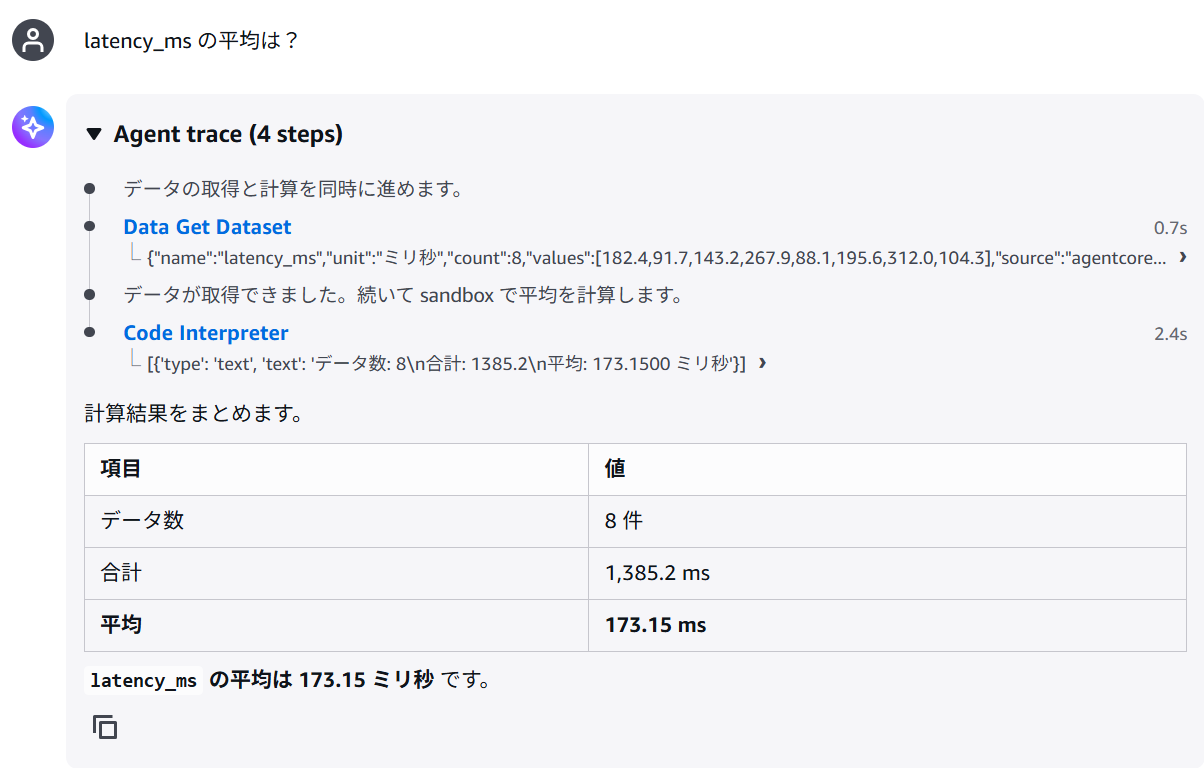
今度は Gateway を介して Lambda が呼べるようになった。
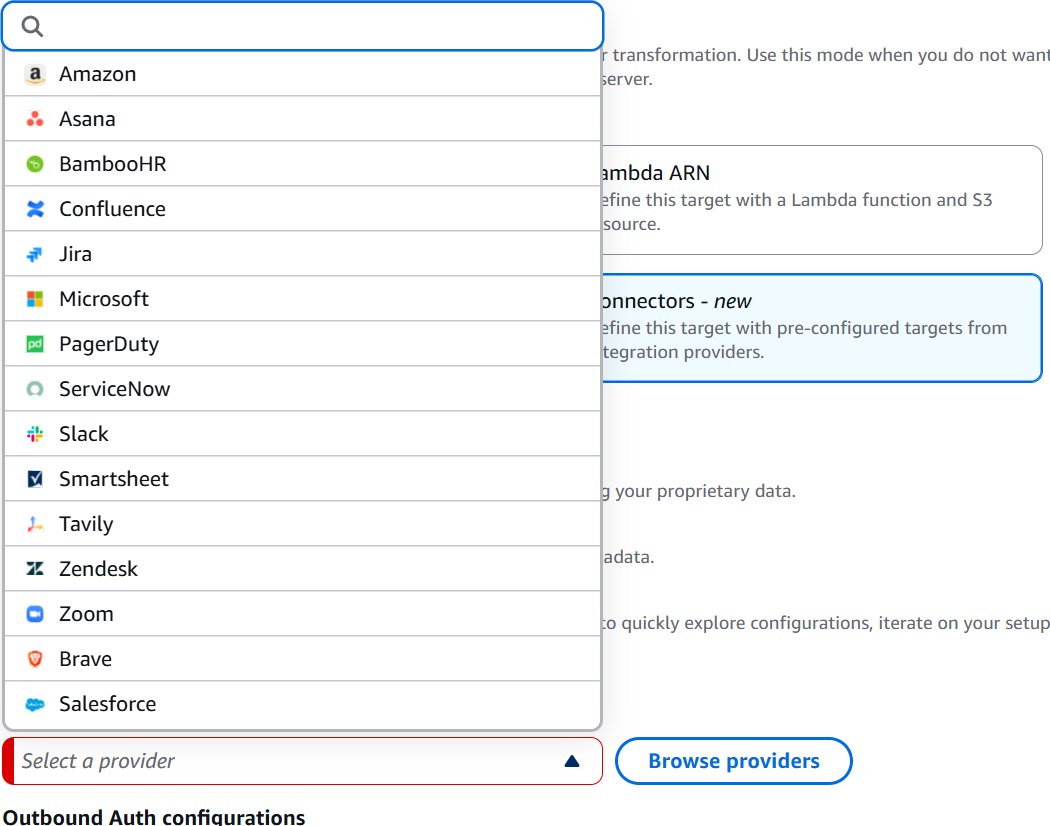
なお、Gateway のターゲットには Lambda や任意の API のほか Slack などの外部プロバイダーを指定することができる。
mcp-proxy-for-aws を用いることでローカルのエージェントからも SigV4 認証で Gateway に接続することができる。 OAuth にも対応しているが Cognito が DCR に対応しておらず client_id が渡せない Claude のアプリなどから繋ごうとすると自前の実装が必要になる。
$ claude mcp add agentcore-gateway -- \
  uvx mcp-proxy-for-aws-cli@latest "https://*****.gateway.bedrock-agentcore.ap-northeast-1.amazonaws.com/mcp" \
  --profile agentcore-external --region ap-northeast-1